You sit down to work at nine, open your laptop, reply to a few emails and get busy with the day’s tasks. Everything seems fine until lunchtime, when you realise you’ve been leaning towards the screen for the past two hours. Your shoulders feel stiff, the chair doesn’t seem as comfortable as it did in the morning, and you’re already looking for an excuse to get up.
Sounds familiar? It happens quite often, especially when we’re working from home and using whatever table or chair was available when we first started. You get used to sitting a certain way, even when it’s not particularly comfortable, and after a while you stop noticing until something starts bothering you.
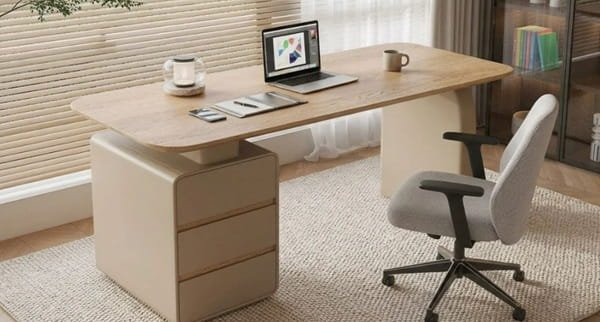
A few changes to your workstation can make working hours easier to manage. And no, you don’t have to replace every piece of furniture or turn your room into a proper office to get started.
1. Set Up Your Workstation to Support a Natural Sitting Posture
Have you ever tried working from the dining table for an entire day? It seems perfectly fine for the first hour, but then you realise the table is a little too high, the chair is too low, and you’re sitting with your shoulders raised just to type comfortably. By the afternoon, you’re constantly shifting around trying to find a better position.
This is why the height of your Office Table matters more than people sometimes realise. When you’re seated, your keyboard and mouse should be at a height that allows your shoulders to stay relaxed, with your elbows comfortably bent. If the table is too high, you may end up raising your shoulders. Too low, and you might find yourself leaning forward.
There’s also the space underneath. Some desks have drawers or panels that leave very little room for your legs, which can become irritating when you’re sitting for several hours. Before choosing an office desk, check whether you can move your legs comfortably and sit close enough to the work surface.
If you’re planning to buy an office table for home use, think about the chair you’ll be using with it. The two need to work together. A lovely-looking desk won’t be particularly useful if you can’t sit at it comfortably.
2. Position Your Screen and Work Essentials for Easy Access
It’s surprising how many times we turn, stretch or lean across the table without even thinking about it. The notebook is on one side, the charger is somewhere behind the monitor, and your phone keeps ending up at the opposite corner. None of these movements seems like much, but doing them repeatedly can get tiring.
Start with the screen. If you’re using a desktop monitor, keep it roughly an arm’s length away as a starting point, then adjust the distance until the text is easy to read. The top of the screen should generally be at or slightly below eye level. You shouldn’t have to keep looking sharply upwards or bending your neck down to see what’s on it.
Laptop users have a slightly different problem. When the screen is at a comfortable viewing height, the keyboard may be too high for comfortable typing. A laptop stand with a separate keyboard and mouse can help when you’re working for longer periods.
And what about all those little things on the desk? Keep the items you reach for regularly close by. Your water bottle, notebook, pens and headphones don’t need to be scattered across the entire surface. An office work table with enough room for your usual equipment can make this easier, but you don’t need an enormous desk just to keep a few essentials nearby.
3. Adjust Your Sitting Position to Reduce Daily Discomfort
A chair can look quite comfortable when you first sit on it. But spend six or seven hours working, and you’ll start noticing things you didn’t pay attention to earlier. Perhaps the seat feels too deep, your feet don’t rest properly on the floor, or the backrest doesn’t support you where you need it.
An Office Chair with suitable adjustments can help you find a more comfortable sitting position. Seat height is a good place to start. Your feet should rest flat on the floor or on a footrest, without the front edge of the seat pressing uncomfortably into the backs of your knees.
The backrest matters too. You should be able to sit with your lower back supported rather than constantly leaning forward towards the screen. If the chair has adjustable armrests, set them so your arms can rest comfortably without pushing your shoulders upwards.
When looking at office seating, don’t assume that more features automatically mean a better chair. An ergonomic office chair might offer several adjustments, but what matters is whether those adjustments suit your height, body proportions and working habits.
And if you’re comparing options marketed as the best ergonomic office chair, try not to get carried away by that label alone. Check the seat dimensions, adjustment range and support features. If you can try the chair before buying, even better.
4. Organise Your Work Area to Limit Unnecessary Movement
There’s always that one desk drawer where everything gets thrown in. A couple of old chargers, loose papers, pens that don’t work and perhaps a USB cable you’ve been keeping for years. You open it looking for a stapler and end up taking half the things out before finding it.
It might be worth spending a little time sorting that drawer rather than buying another organiser. Keep the stationery you use regularly in one place, move old paperwork into a folder and get rid of the things you no longer need. If your work involves several documents, a file holder beside the monitor could save you from spreading papers across the table.
You should still be able to move freely, of course. The idea isn’t to sit completely still all day. It’s more about avoiding awkward reaching and twisting whenever you need something. Frequently used items are easier to handle when they’re within comfortable reach.
Also, check what’s happening underneath the desk. Bags, boxes and spare equipment often end up there because nobody knows where else to keep them. After a while, you’re sitting with your legs tucked into whatever space is left. Clearing that area may make a bigger difference than rearranging the tabletop.
5. Combine Comfortable Seating with Habits That Improve Focus
Even a very comfortable chair won’t make sitting for eight hours without moving a good idea. You might be in the middle of a meeting, working on a report or trying to finish something before lunch, and suddenly realise you haven’t left your seat since morning.
Getting up regularly is worth making part of your working day. You could walk around while taking a short break, refill your water or stand for a few minutes between tasks. There’s no need to make it complicated. Just avoid staying in exactly the same position for too long.
The surroundings matter as well. If your desk is beside a busy passage, you may find yourself getting interrupted whenever somebody walks past. If it’s facing a window with strong afternoon sunlight, glare on the screen can become irritating. A small change in the table position or the use of curtains may help.
And don’t forget the things that distract you without you realising. Your phone lights up, you check one message and somehow ten minutes disappear. Keeping it away from your immediate work area during tasks that need concentration can be useful.
If you’re setting up a new workspace, WoodenStreet has office tables and chairs you can explore. But before deciding on furniture, think about how you actually spend your working hours. Someone who attends video meetings all day may have different requirements from someone who works with large drawings, files or multiple monitors.
6. Build a Workstation That Supports Healthier Workdays
Nobody sits perfectly throughout the day. You might start with your back supported and feet flat on the floor, then find yourself leaning towards the screen when you’re concentrating on something. Or you move your chair closer to the desk and forget to adjust it again.
That’s quite normal, which is why it helps to check your sitting position occasionally rather than expecting to maintain one posture for hours. Move when you need to, change positions and make sure the chair and desk aren’t forcing you into an uncomfortable arrangement.
Before buying anything new, have a proper look at your current workstation. Is the screen too low? Are you sitting too far from the keyboard? Does the chair support your back comfortably? Perhaps the desk is fine, but the chair needs replacing. Or maybe you only need a laptop stand and a little more room for your legs.
If you do decide to change the furniture, look at the measurements and adjustment options rather than choosing something purely for its appearance. WoodenStreet offers work and study furniture worth comparing, but the right choice depends on the space available and how you’ll be using it.
And remember, your workstation doesn’t have to look like the ones you see in office photographs. There might be a coffee mug beside your laptop, a notebook full of reminders and a few papers waiting to be filed. That’s part of a normal working day.
What matters is being able to sit down, get your work done without constantly struggling with the furniture and finish the day without feeling that your desk and chair have made things unnecessarily difficult. Sometimes a few sensible adjustments are all you need to make that happen.